

A Tera Analytics product · version 0.3.1
Batch geospatial processing. Folder in, folder out.
GeoConveyor is a native desktop app that runs convert, warp, mosaic, DEM, point-cloud gridding and ten more operations over whole folders of rasters, vectors and point clouds. Pick the folders, set the options, press Start.
- One binary, no Python, no Qt
- Written in Rust with egui
- Powered by terrio
Why it exists
Four hundred tiles should not mean four hundred command lines.
Command-line geospatial tools are fast and complete. They are also tedious when the job is a whole delivery folder. GeoConveyor builds the command for you and runs it for every file.
The usual way
# write the loop, quote the paths, hope the flags are right
for f in tiles/**/*.tif; do
  terrio convert --format XYZ \
    --compress DEFLATE "$f" \
    "out/$(basename "$f" .tif).xyz"
done
One file at a time, no progress bar, and a half-written file if you hit Ctrl+C.
With GeoConveyor

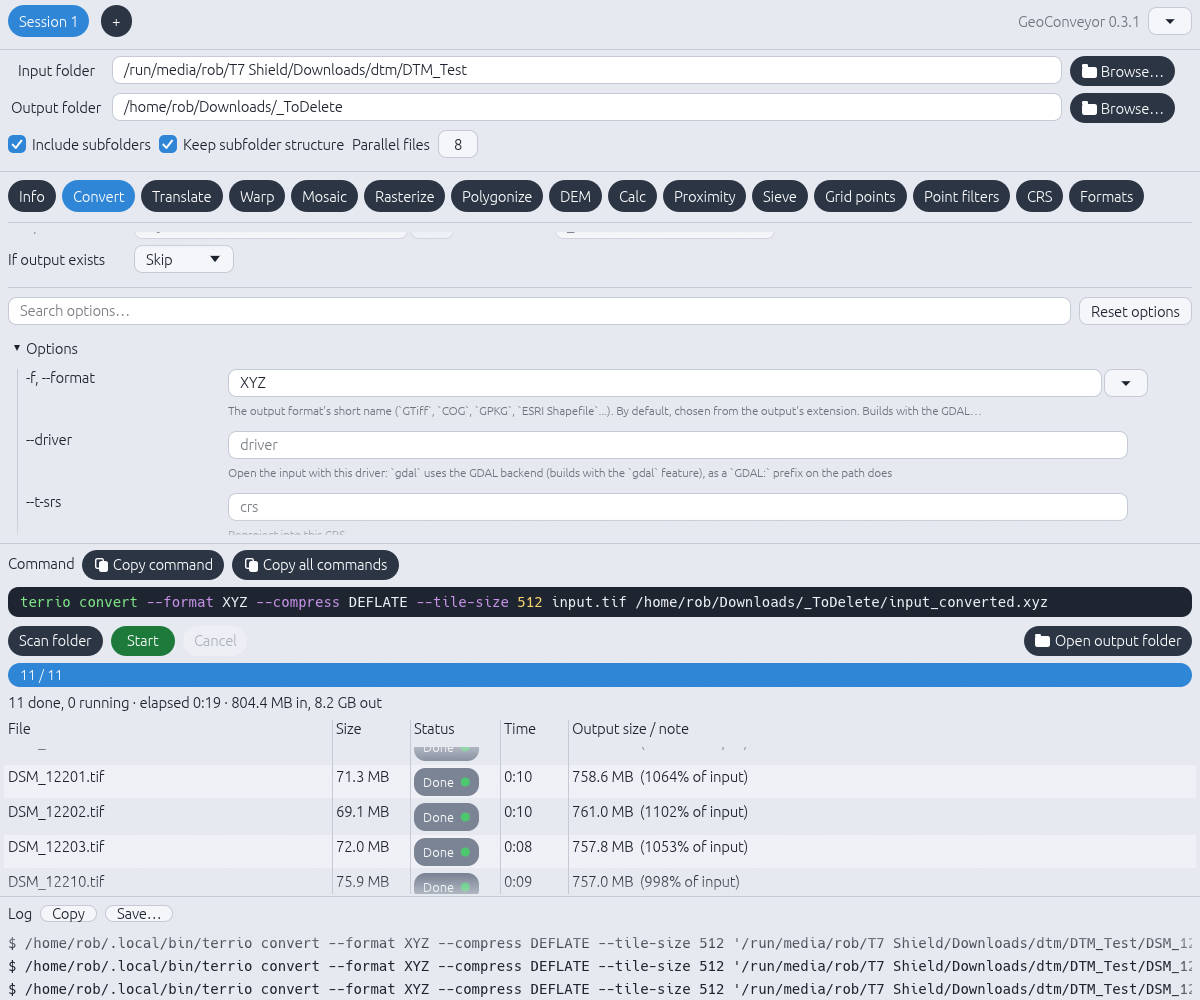
Click Scan folder to list every matching file and its size, subfolders included. Then press Start: eight files run at a time, with live status per file and the same commands available to copy into a script.
What you get
Built for the folder-of-files job.
One tab per command
Fifteen tabs, from Info to Formats. Every option of the terrio you have installed is on the form, so nothing is hidden behind a simplified view.
Options that stay current
Each form is built at start-up from terrio <command> --help. When you upgrade terrio, new flags appear after a Reload. No new GeoConveyor release needed.
Whole folders, in parallel
Include subfolders, keep the folder structure, and choose how many files run at once. Each file gets its own terrio process.
Safe writes
Output is written to a temporary .partial- name and renamed to its final name, such as name_converted.xyz, only when the file succeeds. A failed or cancelled file leaves nothing behind. Choose Skip to leave existing outputs alone.
Scriptable
Copy command and Copy all commands give you the exact command lines. Prototype in the GUI, then paste into a pipeline.
Remembers your setup
Folders and every tab’s options are saved between sessions. The interface is available in English, Spanish, French and German.
Fifteen tabs
The operations you run on every project.
Rasters, vectors and point clouds, each with the full option set of terrio.
Inspect files before you process them.
Change format, compression and tiling.
Subset and rescale rasters.
Reproject to a new coordinate system.
Merge tiles into larger products.
Burn vectors into a raster.
Turn raster regions into polygons.
Derive terrain products from elevation.
Raster math across bands and files.
Distance-to-feature rasters.
Remove small isolated clusters.
Grid point-cloud data into rasters.
Filter point clouds.
Look up coordinate reference systems.
See what your terrio build can read and write.
The exact options on each tab depend on the terrio version you have installed.
Formats
Convert the geospatial formats you already use.
GeoConveyor handles the common raster, vector and point-cloud formats, and converts whole folders of them between formats in one run.
Rasters
- GeoTIFF
- Cloud Optimized GeoTIFF
- JPEG 2000
- ERDAS IMG
- NetCDF
- ESRI ASCII Grid
- XYZ
Vectors
- Shapefile (SHP)
- GeoPackage (GPKG)
- GeoJSON
- KML
- FlatGeobuf
- File Geodatabase
Point clouds
- LAS
- LAZ
This is a sample of the most common formats. The full list depends on your terrio build; the Formats tab shows exactly what it can read and write.
How it works
The GUI never reimplements the tool. It builds the command.
GeoConveyor is a front end for terrio. That keeps results identical to the command line and keeps the app small.
Choose your folders
Set an input and an output folder. Scan folder lists every matching file and its size before anything runs.
Choose a command and options
Open a tab, set the flags you need, and watch the exact terrio command update underneath.
Press Start
Files run N at a time. Progress, size in and out, time per file and a full log update as they finish.
Install
Download, unzip, run.
GeoConveyor needs terrio installed separately. Install that first, then pick your platform.
Step 1. Install terrio
GeoConveyor finds terrio on your PATH, plus ~/.local/bin on Linux and %APPDATA%\Python\Scripts on Windows. If it lives somewhere else, browse to it in Settings.
Linux or macOS
curl -LsSf https://terrio.opengeos.org/install.sh | sh
Windows, or any OS
pip install terrio
Windows
GeoConveyor0_3_1_windows.zip · about 12.5 MB
Unzip it. Inside are two options:
- GeoConveyor-0.3.1-setup.exe is the installer. Run it and follow the prompts.
- GeoConveyor-0.3.1-windows-portable.zip needs no install. Unzip anywhere and run
geoconveyor.exe.
terrio’s own Windows build needs the Microsoft Visual C++ Redistributable. If terrio will not start, GeoConveyor tells you, and the installer offers the download.
Linux
GeoConveyor0_3_1_linux.zip · x86-64
Unzip it. Inside are two options:
- geoconveyor-linux-x86_64 is a single binary. Make it executable and run it.
- GeoConveyor-0.3.1.flatpak gives you a menu entry and icon.
chmod +x geoconveyor-linux-x86_64
./geoconveyor-linux-x86_64
flatpak install --user GeoConveyor-0.3.1.flatpak
flatpak run xyz.teraanalytics.GeoConveyor
The Flatpak sandbox cannot see system programs, so it runs your installed terrio through flatpak-spawn --host. Install terrio on the host, not inside the sandbox. No -dev packages are needed; file dialogs use the desktop portal present on standard GNOME and KDE desktops.
Other platform? GeoConveyor builds from source with cargo build --release. See the build notes on GitHub.
Licensing
Free for individuals, students and small companies.
GeoConveyor is source-available, not OSI open source. What you pay depends on who you are.
| You are | Cost | Terms |
|---|---|---|
| An individual using it personally | Free | Additional Permissions, section 1 |
| A student, teacher or academic researcher | Free | Additional Permissions, section 2 |
| A company with fewer than 100 people and under about US$1M annual revenue | Free | PolyForm Small Business 1.0.0 |
| A larger company, a government agency, or a contractor working for one | Commercial license | Contact us |
Not sure which row applies, or working at a nonprofit or public research organization? Get in touch. Free and discounted licenses are available case by case. These terms cover GeoConveyor only. terrio is installed separately and is MIT licensed.
Early release
Found a bug or a mistranslation? Tell us.
This is version 0.3.1. The Spanish, French and German interface text was translated with AI assistance, so reports of wrong or awkward wording are especially welcome.
Include your OS, the command tab you were on, and the command shown under Command or in the Log.
Open an issue on GitHubGeoConveyor is a product of Tera Analytics LLC. Licensing terms apply only to code written by Tera Analytics LLC. Thanks to the terrio project, to David Tran and the original Inventis authors of OGR2GUI, and to GDAL/OGR.